What does Allow External and Anonymous INVITE's mean?
This feature allows your phone number and/or SIP User to be called from another VoIP platform using its SIP URI format.
This is a technical term for another way to reference your devices and/or phone numbers at Yay.com, instead of simply dialling a number. It's often used by 3rd party platforms to bridge together a number of calls or do clever things with conference bridges etc.
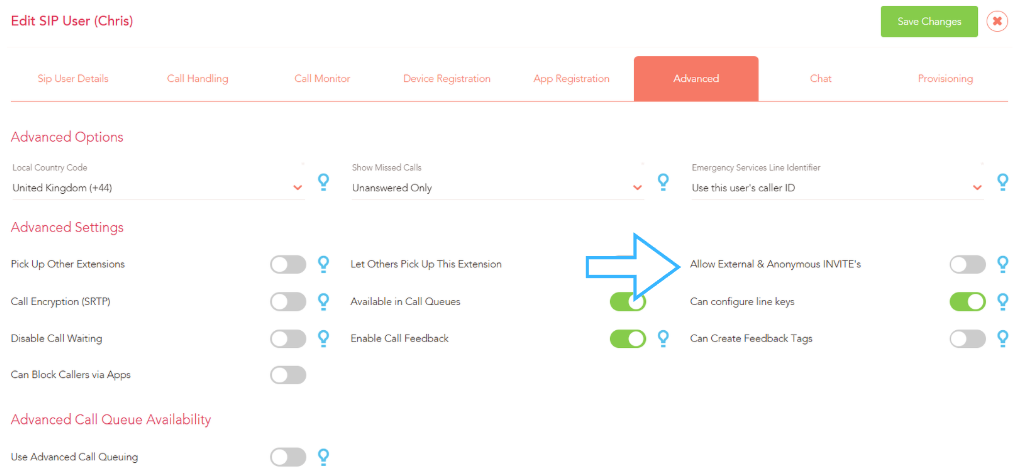
This feature is turned off by default for Yay.com users but is easily turned on under Voice > Users > Advanced for a SIP User:
or Voice > Numbers for a phone number:
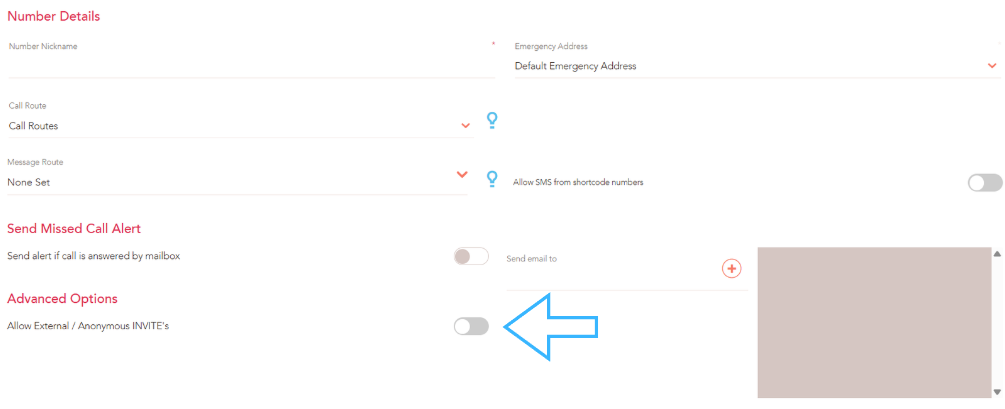
Once activated you can reach your phone number or device from another platform or VoIP phone using the conventions of:
For a Phone Number SIP URI:
[number]@talk.yay.com where [number] is replaced with the phone number on our platform you wish to reach. This must have the prefix for your country at the front - e.g. for UK Numbers, start with '44'.
For a SIP User
[Sip User]@talk.yay.com where [Sip User] is replaced with the SIP User on our platform you wish to reach.
A small word of caution is that when you have this feature turned on, your phone number and/or sip user is freely available to be "dialled" in the digital VoIP world.
That means it can be called by digital platforms using the Internet for free versus paying a call charge to their provider; you are therefore likely to receive more "spam" calls.