What are some useful config lines for my Grandstream devices?
Each Grandstream device has its own set of P values for different settings. The majority of these are the same between models, however differences can occur.
We’ve compiled a list of practical P values for the most popular Grandstream models our customers have!
This list includes useful config lines for the following Grandstream devices:
- Grandstream GXV33xx devices
- Grandstream WP820
- Grandstream WP810/22/25 devices
- Grandstream GXP16xx devices
- Grandstream GXP21xx devices (excl. GXP2124)
Sort Phonebook By First/Last Name
All the Grandstream models listed above have the same P value for this setting:
P92914=0
Sort Phone Book by:
0 - Last Name
1- First Name
The default value is 0.
Adding A Remote Phone Book
All the Grandstream models listed above have the same P value for this setting:
Download mode:
P330=3
3 - HTTPS
This value should always be set at 3 as this is the required protocol type to download the Phone Book from the Yay.com server.
String/Phone Book URL:
P331=(Enter Phone Book URL from Yay.com portal omitting the “https://”)
HTTPS Username:
P6713=(Enter Phone Book Username from Yay.com portal)
HTTPS Password:
P6714=(Enter Phone Book Password from Yay.com portal)
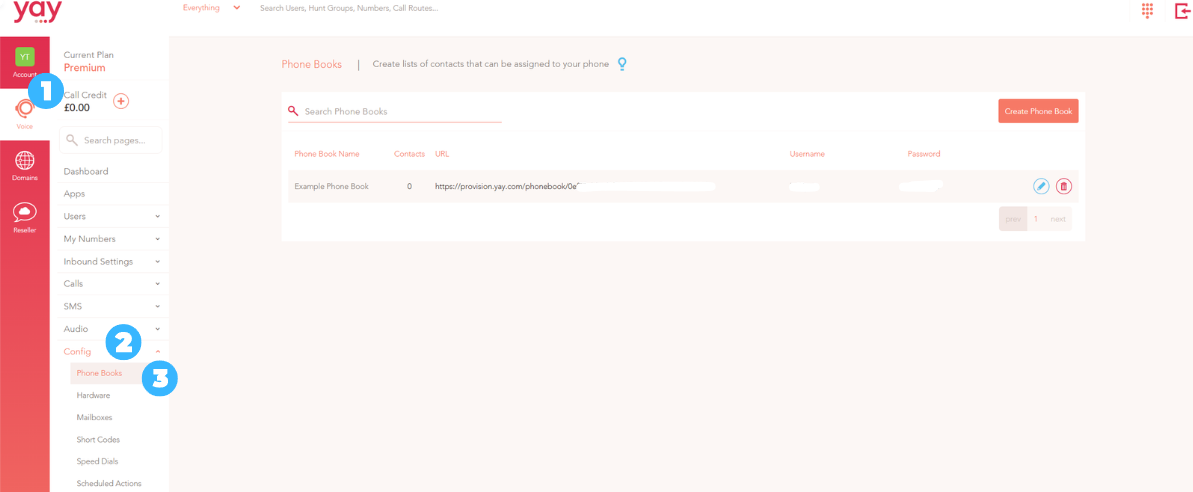
To find your Phone Book in the Yay.com portal, go to:
1. Voice
2. Config
3. Phone Books
Set The Time Display Format
All the Grandstream models listed above have the same P value for this setting:
P122=1
Time Display Format:
0 - 12 Hour
1 - 24 Hour
The default value is 1.
Enable/Disable LED For Missed Call Notifications
This option is not available for Grandstream GXP21xx or GXP16xx models.
GXV33xx & WP820: P1691=0
WP810/22/25: P82286=0
Enable Missed Call Indicator:
1 - No
0 - Yes
The default value is 0.
Set The Preference For Call Transfers
This option is not available for Grandstream WP820 or WP810/22/25.
GXV33xx: P1685=0
GXP21xx & GXP16xx: P8390=0
Default Transfer Mode:
0 - Blind Transfer
1 - Attended Transfer
2 - Attended Transfer Only
The default value is 0.
Allow Speed Dial/BLF Keys To Be Pressed To Transfer During An Active Call
This option is not available for Grandstream WP820 or WP810/22/25.
GXV33xx, GXP21xx & GXP16xx: P22162=0
Enable transfer via Non-Transfer Programmable Key:
0 - No
1- Yes
The default value is 0.
Preferred Audio Codecs
Account/Line 1 Only - there are different P values for any additional accounts.
All the Grandstream models listed above have the same P value for this setting:
First codec:
P57=0
Second codec:
P58=8
Third codec:
P59=9
Fourth codec:
P60=9
Fifth codec:
P61=9
Sixth codec:
P62=9
Seventh codec:
P46=9
Eighth codec:
P46=9
Preferred Vocoder:
0 - PCMU
8 - PCMA
9 - G.722
2 - G.726-32 (Not available for Grandstream WP820)
18 - G729A/B
98 - iLBC
123 - Opus (Not available for Grandstream GXP16xx or GXP21xx)
If you have any issues with this, or have any questions, please contact Yay.com support on 0330 122 6000, or send in an email to help@yay.com.