How does the Yay.com Smart Dialler work?
Within the Keypad for the Yay.com Desktop app, you have the option to make an outbound call with a different connected device to your user! This can be seen in the top right of the Keypad - by default this is already connected to "This Device".
From here, you can make an outbound call using the application you are on, or another device on your user, such as:
1. Any SIP device that is currently registered to this user
2. Any other app instance (such as the mobile app)
3. Any number you have added in the External Numbers section of the app
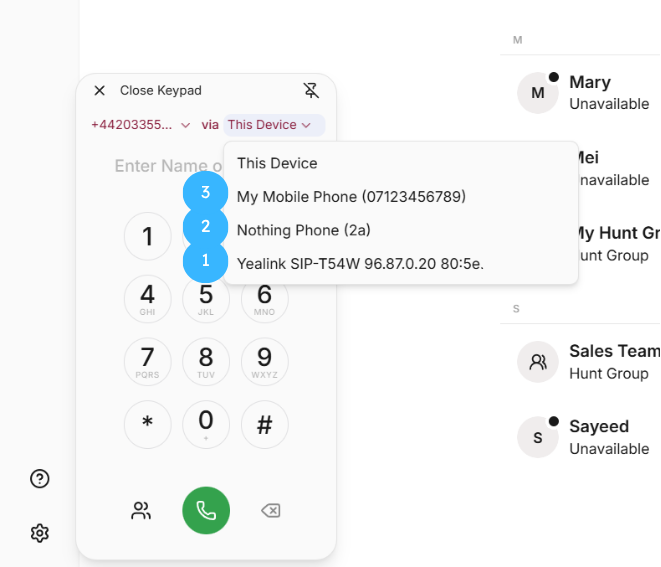
By choosing one of these options, you can then type in a number and make the outbound call, and then the following will happen:
1. The device you choose will now receive an inbound call
2. If you answer this call on that device, you have now activated the Smart Dialler, and an outbound call to the number you originally dialled on the Desktop app will be made, but using your chosen device instead.
Adding an External number:
To add an External Number to your account:
1. Head to Settings > Calls > My External Numbers on the Yay.com desktop app
2. Press the '+ Add External Numbers' button

3. Type in the External Number relating to the device you would like to use to make outbound calls from
4. Give it a Label
5. Press 'Save'
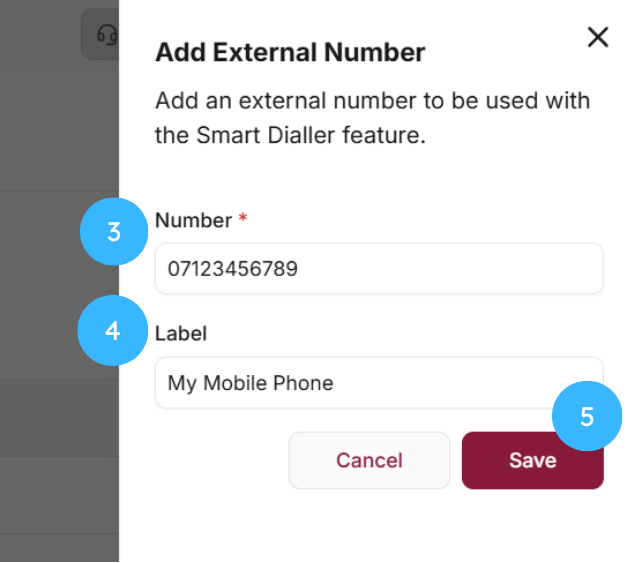
The number should now be added to your list of 'External Numbers' and will appear on your Keypad when choosing a device to make an outbound call from.